Scottrade® Mobile App1.11.1
Publisher Description
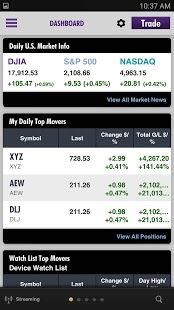
Get the information you need right when you need it through the new Scottrade® Mobile app for the Android™. With quick navigation and polished design, the redesigned Scottrade® Mobile app delivers data you can tailor to your portfolio and investment strategy.
Download now for:
• Real-time, streaming quotes
• Market research
• Charting
• Stocks, ETFs, options
• Watch lists synced to the Scottrade® client website
• Scottrade Bank® access
Scottrade, Inc. and Scottrade Bank are separate but affiliated companies and are wholly-owned subsidiaries of Scottrade Financial Services, Inc. Brokerage products and services offered by Scottrade, Inc. - Member FINRA and SIPC. Deposit products and services offered by Scottrade Bank, Member FDIC.
Brokerage Products Not FDIC-Insured - Not Bank Guaranteed - May Lose Value.
Market volatility, volume, and system availability may impact account access and trade execution.
Investors should consider the investment objectives, risks, charges, and expenses of an exchange-traded note (ETN), closed-end fund (CEF) or exchange-traded fund (ETF) carefully before investing. A prospectus contains this and other information. An ETN, ETF or CEF prospectus can be obtained directly from the issuer. The prospectus should be read carefully before investing.
Scottrade®, the Scottrade® logo, and all other trademarks, whether registered or unregistered, are the property of Scottrade, Inc. and its affiliates.
© 2016 Scottrade, Inc. All rights reserved.
About Scottrade® Mobile App
The company that develops Scottrade® Mobile App is Scottrade, Inc. The latest version released by its developer is 1.11.1. This app was rated by 2 users of our site and has an average rating of 2.5.
To install Scottrade® Mobile App on your Android device, just click the green Continue To App button above to start the installation process. The app is listed on our website since 2016-07-19 and was downloaded 67 times. We have already checked if the download link is safe, however for your own protection we recommend that you scan the downloaded app with your antivirus. Your antivirus may detect the Scottrade® Mobile App as malware as malware if the download link to com.scottrade.mobile.retail is broken.
How to install Scottrade® Mobile App on your Android device:
- Click on the Continue To App button on our website. This will redirect you to Google Play.
- Once the Scottrade® Mobile App is shown in the Google Play listing of your Android device, you can start its download and installation. Tap on the Install button located below the search bar and to the right of the app icon.
- A pop-up window with the permissions required by Scottrade® Mobile App will be shown. Click on Accept to continue the process.
- Scottrade® Mobile App will be downloaded onto your device, displaying a progress. Once the download completes, the installation will start and you'll get a notification after the installation is finished.
Program Details
System requirements
Download information
Pricing
Version History
version 1.11.1
posted on 2016-07-19
• Minor bugs fixed.,Recent Updates:,• Added three new cards in the Dashboard to help you monitor the market, your default Watch List and account info effectively. You can also build your own dashboards by selecting and prioritizing dashboard cards as desired.,• Extended the expiration days of Passkey from 30 days to one year.,• Enhanced the Tutorial to lead you to experience features easily.,• The Scottrade Mobile App now offers the ability to deposit checks to brokerage and bank accounts.
version Varies with device
posted on 2014-11-06
Several fixes and updates
